![Logo_BW-1.png]](https://customers.seatti.co/hs-fs/hubfs/Logo_BW-1.png?height=31&name=Logo_BW-1.png)
The visitor management function in Seatti allows you to invite external guests. This is particularly useful for meetings or business appointments where external participants are invited who need to register at the reception before entering your premises.
Seatti also offers various other options of making bookings for colleagues
(when no registration at the reception is needed):
This article explains how to invite an external user.
Once a visitor has been invited, you as an administrator can view the visitor status and manage all visitor bookings under Visitor Management.
Overview of Visitor Management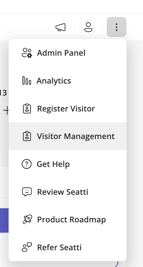
In the admin panel, you will find the Visitor Management section in the navigation menu.
Here, you as an admin can:
- Register visitors (How can I invite visitors?)
- Manage visits
- Customize which info is requested from visitors
- See the status of which visitors have checked in/out
- Export visitor lists
Overview of the functionality:
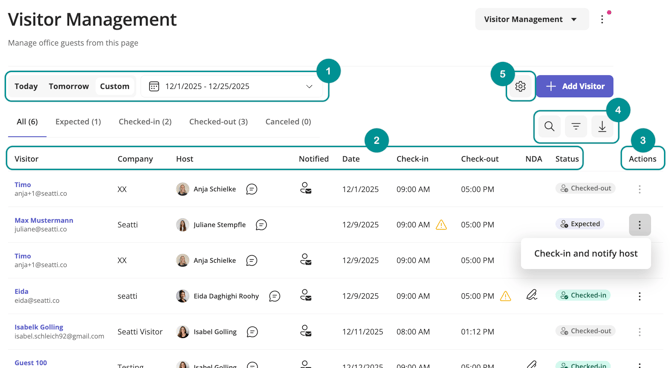
1. Filter by a specific time period
By default, “Today” is selected. Via “Custom”, you can choose a custom, longer time frame.
Booking data is stored for 3 months and then deleted automatically.
2. Information bar
- Visitor's name
- Visitor's email address
- Access the visitor badge (and print it)
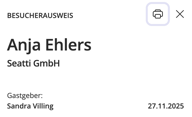
- Company
- Internal host's name
- option to notify the host
- Status of the guest notification/invitation via email
- Date of visit
- Start and end time of the planned visit
- Status of NDA agreement (if requested)
- Check-in/out status
- Actions
3. Admin options
- Check visitors in and out
- Notify the host
- Cancel a visit
4. Export and reporting
- Search by name, company, etc.
- Filter by overdue check-ins and check-outs
- Download visitor lists
5. Settings
In the Settings, you can define which fields must be completed by the visitor in the registration form in prior to the visit. In addition, a non-disclosure agreement (NDA) can be attached to the form as a PDF file.